When you hit play on a 4K video, it launches right away and buffers a flawless image in a matter of seconds. Before your thumb even leaves the screen, a text message you send reaches a device halfway around the globe. You never pause to wait for the high-resolution photos to load as you scroll through an endless feed of them.
Although we consider these everyday digital wonders to be magical, they are actually the outcome of robust System Design Principles.
Every seamless Netflix binge, instantaneous Google search, and Instagram feed conceals a chaotic world of network outages, hardware constraints, and enormous traffic spikes. The internet is unreliable and noisy. Power grids fail, hard drives crash, and cables are severed. Engineers use a particular set of system design principles to control that chaos, which is the only reason your digital life feels smooth.
This guide serves as your backstage pass to the internet. We will explore the invisible choices that keep the digital world spinning, from the tiny transistors inside your CPU to the enormous, dispersed architecture of a live-streaming titan like YouTube.
Table of Contents
1. The Hardware Reality: The Physics of Computing
Before we can design a system like Netflix or Uber, we have to understand the physical machine it runs on. It is easy to think of “The Cloud” as an ethereal, infinite resource, but at its core, the cloud is just someone else’s computer. And computers have physical limits.
The “Distance to Data” Gap
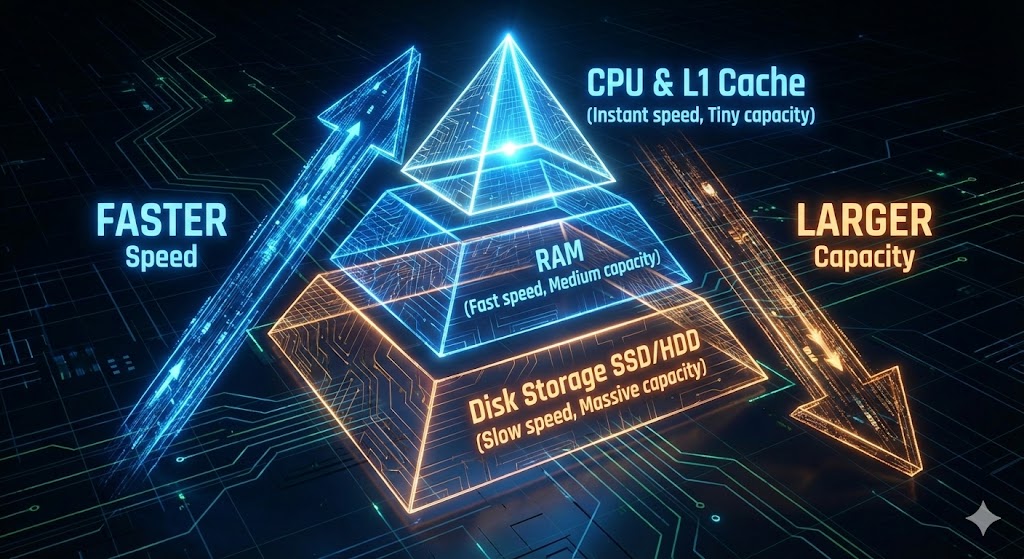
The Memory Hierarchy is one of the most important ideas in system design principles. Computers use a layered system to maximize performance; the closer memory is to the CPU (the brain), the faster, smaller, and more expensive it becomes.
- Disk Storage (HDD/SSD): This is where your files live permanently. It is massive (Terabytes) but relatively slow.
- RAM (Random Access Memory): This is where active programs live. It is fast, but volatile—data vanishes when the power is cut.
- L1/L2 Cache: This is tiny, ultra-expensive memory located right on the CPU silicon itself.
To visualize the speed difference, the System Design Concepts course offers a brilliant analogy that puts these nanoseconds into human terms.
- L1 Cache: Accessing data here is like picking up a paper from your desk. It takes seconds.
- RAM: Accessing data here is like walking to the parking lot to get a file from your car. It takes minutes.
- Disk (SSD/HDD): Retrieving data from the hard drive is comparable to flying to another city to pick up a single piece of paper. It takes days.
Because of this massive speed difference, caching is a fundamental principle of system design. In order to prevent the CPU from having to travel to the “other continent” (Disk) to retrieve frequently used data, engineers battle hard to keep it on the “desk” (Cache). Writing code is only one aspect of system design; another is handling the logistics of transferring data between these layers in order to reduce latency.
The “Nines” of Availability
Once we understand the hardware, we must assess its reliability. In the IT field, reliability is measured in “nines.” It may appear to be a slight semantic distinction, but the difference between three and five nines is the difference between a minor hiccup and a public relations nightmare.
- 99.9% (Three Nines): The system can be down for about 8.76 hours a year. This is acceptable for a personal blog or a non-critical internal tool.
- 99.99% (Four Nines): The system can be down for 52 minutes a year. This is the standard for most commercial e-commerce platforms.
- 99.999% (Five Nines): The system can only be down for 5 minutes a year. This is the “Gold Standard” required for hospitals, emergency services, and global financial platforms.
Getting those extra nines needs a significant investment in redundancy. You cannot simply hope that your server does not fail; you must design a system that thinks it will fail and has a backup ready to take over immediately. This is managed by SLOs (Service Level Objectives), which are internal goals, and SLAs (Service Level Agreements), which are contractual obligations made to customers.
2. The “Impossible” Decisions: The CAP Theorem
In a perfect world, a distributed database would be quick, reliable, and unbreakable. In the real world, you cannot have everything. This gets us to the CAP Theorem (also known as Brewer’s Theorem), which is the “Iron Triangle” of system design ideas.
The theorem proves that when a system is distributed across multiple servers (nodes), you can only guarantee two of the following three traits at the same time:
- Consistency: Every read receives the most recent write or an error. In other words, everyone sees the same data at the exact same time (like a shared Google Doc).
- Availability: Every request receives a response, without the guarantee that it contains the most recent write. The system is always “up,” even if the data is slightly stale.
- Partition Tolerance: The system continues to operate despite an arbitrary number of messages being dropped or delayed by the network.
The Reality Check
Here’s the catch: Because networks inevitably fail (cables get cut, switches overheat), Partition Tolerance (P) is unavoidable in a distributed system. You cannot disregard network outages. As a result, engineers must make a difficult decision between consistency (C) and availability.
- The Banking Choice (CP System): If an ATM loses connection to the main bank server, it must stop you from withdrawing money. It prioritizes Consistency (preventing an overdraft) over Availability. It would rather show you an error message than the wrong account balance.
- The Social Media Choice (AP System): If Instagram’s database in Asia loses sync with the database in the US, it will still let you scroll your feed. You might see a “Like” count that is 5 seconds old, but the app works. They prioritize Availability over strict Consistency. This leads to a concept called Eventual Consistency—the data will be correct eventually, but not essentially right now.
3. Scaling: How to Handle Growth
When an application starts, it usually lives on a single server. But as you grow from 100 users to 100 million, that single server will crash. To survive, you must scale. There are two primary ways to do this.
Vertical Scaling (Scaling Up)
This is the intuitive approach: buy a bigger computer. If your server has 8GB of RAM and is slow, you upgrade it to 64GB.
- Pros: It is simple. You don’t have to change your code or database architecture.
- Cons: It has a hard limit (there is a maximum amount of RAM you can buy), and it introduces a Single Point of Failure. If that one monster machine crashes, your entire business goes offline.
Horizontal Scaling (Scaling Out)
This is the “System Design” approach: buy more computers. Instead of one monster server, you have 1,000 small, cheap servers working together.
- Pros: Infinite scalability. If you get more users, you just add more cheap servers.
- Cons: Complexity. You now have to manage communication between 1,000 servers, handle data synchronization, and manage distributed errors.
The Traffic Controllers: Load Balancers
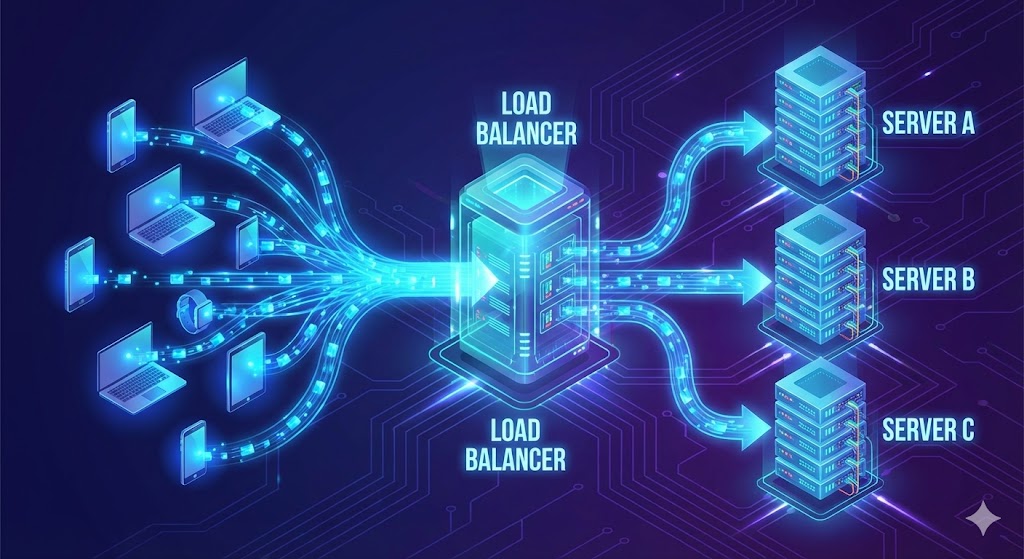
If you choose Horizontal Scaling, you face a new problem: How does a user know which of the 1,000 servers to talk to? You need a Load Balancer.
A Load Balancer sits between the user and your fleet of servers. It acts as a traffic cop, distributing incoming requests based on specific algorithms:
- Round Robin: The simplest method. Request 1 goes to Server A, Request 2 to Server B, Request 3 to Server C, and then it loops back. It’s fair but “dumb”—it doesn’t care if Server A is struggling with a heavy video upload while Server B is idle.
- Least Connections: The load balancer is smarter here. It sends the new request to the server with the fewest active users. This prevents any single server from getting bogged down.
- IP Hashing: The balancer uses the user’s IP address to ensure they always connect to the same server. This is crucial for applications that need to remember “session state” (like a shopping cart) locally on the server. If I add an item to my cart on Server A, I need my next request to go back to Server A, or my cart will appear empty.
4. Proxies: Hiding the Complexity
While Load Balancers manage traffic volume, Proxies manage traffic security and identity. In system design, understanding the difference between a Forward and Reverse Proxy is essential.
Forward Proxy (The User’s Shield)
A Forward Proxy sits in front of the client (you). When you send a request, it goes to the proxy first, which then forwards it to the internet.
- Use Case: This is often used to hide the client’s IP address (VPNs) or to bypass geo-restrictions. Companies also use it to block employees from accessing certain sites (like Facebook) from the office network.
Reverse Proxy (The Server’s Shield)
A Reverse Proxy sits in front of the server. When a request comes from the internet, it hits the proxy first, which then decides which internal server handles it.
- Use Case: This is the unsung hero of modern apps. A Reverse Proxy (like Nginx) handles:
- Security: It hides the topology and IP addresses of your internal servers so hackers can’t attack them directly.
- SSL Termination: Encrypting and decrypting HTTPS traffic takes a lot of CPU power. The proxy handles this “handshake,” freeing up the web servers to focus on building the webpage.
- Caching: If 1,000 people ask for the same static image, the proxy serves it once from its own memory without bothering the backend database.
5. Database Architecture: Where the Data Lives
As your application scales, your database will become the bottleneck. The “System Design Concepts” video outlines several strategies to manage this data explosion.
SQL vs. NoSQL
- Relational Databases (SQL): Think of this as a “Well-Organized Filing Cabinet.” Everything has a place, relationships are strict, and data integrity is paramount. This is perfect for User Metadata (Profiles, Login info), where we need ACID compliance (Atomicity, Consistency, Isolation, Durability). You don’t want a user to successfully pay for an item but fail to generate an order number.
- NoSQL Databases: Think of this as a “Brainstorming Board with Sticky Notes.” It is flexible, fast, and easy to rearrange. This is perfect for unstructured data like Comments, Likes, or IoT sensor logs. These databases (like Cassandra or MongoDB) are optimized for massive write speeds and horizontal scaling, often sacrificing strict consistency for speed.
Sharding (Partitioning)
When a database gets too big for one server (e.g., 10 Terabytes of user data), we split it up. This is called Sharding.
- Vertical Partitioning: We split by feature. All user profiles go to Server A, all photos go to Server B. This is easy but has limits.
- Horizontal Partitioning (Sharding): We split the same table across multiple servers. For example, Users A-M go to Database 1, and Users N-Z go to Database 2.
- The Danger: If you shard by name, and “Smith” is a very common name, the “S” partition will be overloaded. This is called a “Hot Partition.” Engineers use sophisticated hashing algorithms (like Consistent Hashing) to distribute data evenly and avoid these hot spots.
6. Case Study: Designing a Live Streaming App
Theory is useful, but engineering is about building. Let’s apply these system design principles to design a massive Live Streaming App (like YouTube Live or Twitch), based on the practical walkthrough in the System Design for Beginners Course.
Step 1: Requirements Gathering
We start by defining what the system actually needs to do.
- Functional Requirements: Users need to upload video, watch video in real-time, and post comments.
- Non-Functional Requirements: The system needs high availability (the stream can’t buffer), low latency (comments should appear instantly), and scalability (it needs to handle 1 million concurrent viewers).
Step 2: The Data Flow (Ingest vs. Delivery)
Video streaming is unique because the way we receive video from the creator is different from how we send it to the viewer.
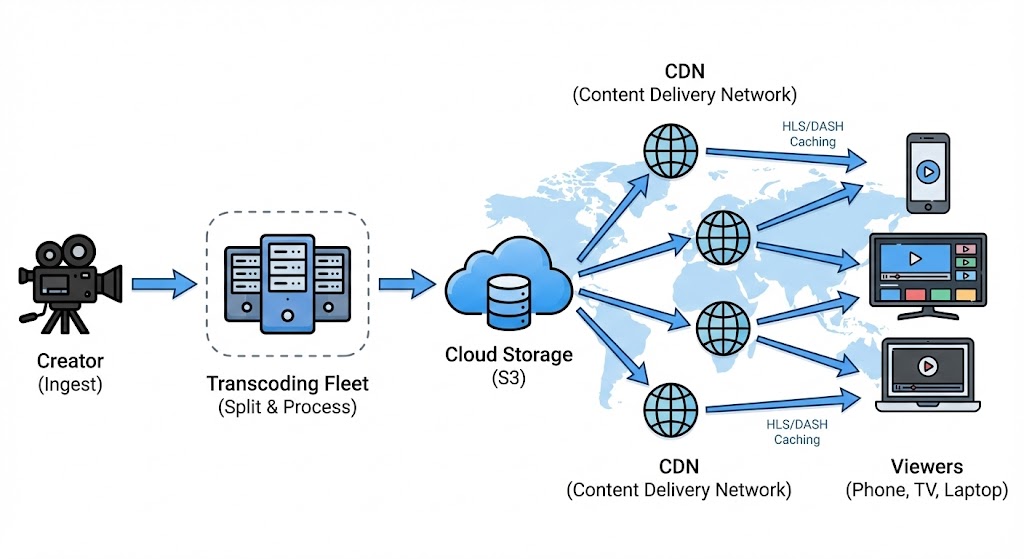
The Ingest (The Creator): When a creator starts a stream, they need a stable, high-quality connection to the server. We typically use a protocol like RTMP (Real-Time Messaging Protocol). This is a TCP-based protocol designed to maintain a persistent connection. We cannot afford to lose packets here, because if the source is corrupted, everyone watches a corrupted stream.
The Processing (The MapReduce Pattern): We can’t just beam the creator’s raw 8K video to a user on a shaky 3G connection in a subway tunnel. We need to create multiple versions of the video (1080p, 720p, 480p) so the user’s device can switch between them automatically. This is where we use a processing pipeline, often employing the MapReduce pattern:
- Split: The raw video stream is chopped into small 10-second segments.
- Map: These segments are distributed to a fleet of “transcoding servers.” One server converts segment #1 to 720p, another converts segment #2 to 480p, etc.
- Store: The processed segments are saved into a distributed file system like Amazon S3 or HDFS.
The Delivery (The Viewer): For the millions of viewers, we don’t use RTMP. We use adaptive HTTP-based protocols like HLS (HTTP Live Streaming) or MPEG-DASH. Why HTTP? Because the internet is built for it. It allows us to use standard CDNs (Content Delivery Networks) to cache these video segments globally.
- Adaptive Bitrate Streaming: If a user’s internet drops, the video player automatically requests the next 10-second chunk in a lower quality (e.g., dropping from 1080p to 480p). This logic happens on the client side (your phone), not the server. The server just provides the chunks; your phone decides which one to ask for.
Step 3: API Design and State
Once the architecture (High-Level Design or HLD) is set, we move to Low-Level Design (LLD). This is where we stop drawing boxes and start defining APIs—the contract between the frontend (the app) and the backend (the server).
POST /comment: Adds a comment.GET /video/{id}: Returns the video metadata.GET /video/{id}/manifest: Returns the HLS manifest file so the player knows which chunks to download.
The System Design for Beginners course highlights the importance of defining these APIs alongside the architecture. A poorly designed API that retrieves an excessive amount of data (“over-fetching”) might slow down the mobile app and deplete the user’s battery. This is why modern paradigms such as GraphQL are gaining popularity—they allow the client to request only what they require (“I only need the video title, not the description”), decreasing data burden on the network.
Handling State (“Resume Watching”): One specific LLD challenge is the “Resume” feature. If a user watches 10 minutes of a video, pauses, and comes back a day later, how do we know where they left off?
- Option A: The client (phone) remembers the timestamp. This is easy but fails if the user switches to their laptop.
- Option B: The server remembers. We create a
WatchedVideoobject in our database. Every few seconds, the video player sends a “heartbeat” to the server updating this timestamp. This allows for a seamless cross-device experience, a hallmark of good system design.
Conclusion: The Art of Compromise
If there is one takeaway from these engineering deep dives, it is that there is no perfect system. System design is a game of trade-offs.
- You want extreme speed? You might have to sacrifice data consistency (Caching).
- You want 100% uptime? You will pay a fortune in redundant hardware (Availability).
- You want high-quality video? You will introduce latency while the system buffers and transcodes (Processing).
System Design Principles are not about finding the “correct” answer; they are about finding the “least wrong” answer for your specific problem. It is the art of negotiation between hardware limits, business costs, and user experience.
The next time you open an app and it just works, take a moment to appreciate the invisible architecture holding it up. It’s not magic—it’s a carefully balanced equation of caches, proxies, load balancers, and intentional failures, running silently in the background to keep your digital world alive.
Want to Dive Deeper?
This guide was inspired by two incredible resources that are must-watches for any aspiring engineer. If you want to see these concepts explained with live whiteboard sessions and code walkthroughs, check them out here:
- System Design Concepts Course: Watch the full breakdown here
- System Design for Beginners Course: See the practical examples here
Enjoyed this deep dive? I write articles deconstructing the complex engineering behind the tools we use every day. [Click here to visit my blog] and subscribe to stay updated with more articles like this one.